Configuration
KasmVNC is configured via YAML based configurations. The server level configuration is at /etc/kasmvnc/kasmvnc.yaml. Edits to this file apply to all users. Individual users can override server global configurations by specifying them in their configuration file at ~/.vnc/kasmvnc.yaml.
Default Configurations
The following configuration shows all default settings. Many of the encoding settings can be overridden by the client, unless the runtime_configuration.allow_client_to_override_kasm_server_settings setting is set tot false. By default the client is allowed to modify encoding settings.
desktop:
  resolution:
    width: 1024
    height: 768
  allow_resize: true
  pixel_depth: 24
  gpu:
    hw3d: false
    drinode: /dev/dri/renderD128

network:
  protocol: http
  interface: 0.0.0.0
  websocket_port: auto
  use_ipv4: true
  use_ipv6: true
  udp:
    public_ip: auto
    port: auto
    stun_server: auto
  ssl:
    pem_certificate: /etc/ssl/certs/ssl-cert-snakeoil.pem
    pem_key: /etc/ssl/private/ssl-cert-snakeoil.key
    require_ssl: true
  # unix_relay:
  #   name:
  #   path:


user_session:
  new_session_disconnects_existing_exclusive_session: false
  concurrent_connections_prompt: false
  concurrent_connections_prompt_timeout: 10
  idle_timeout: never

keyboard:
  remap_keys:
  ignore_numlock: false
  raw_keyboard: false

pointer:
  enabled: true

runtime_configuration:
  allow_client_to_override_kasm_server_settings: true
  allow_override_standard_vnc_server_settings: true
  allow_override_list:
    - pointer.enabled
    - data_loss_prevention.clipboard.server_to_client.enabled
    - data_loss_prevention.clipboard.client_to_server.enabled
    - data_loss_prevention.clipboard.server_to_client.primary_clipboard_enabled

logging:
  log_writer_name: all
  log_dest: logfile
  level: 30

security:
  brute_force_protection:
    blacklist_threshold: 5
    blacklist_timeout: 10

data_loss_prevention:
  visible_region:
    # top: 10
    # left: 10
    # right: 40
    # bottom: 40
    concealed_region:
      allow_click_down: false
      allow_click_release: false
  clipboard:
    delay_between_operations: none
    allow_mimetypes:
      - chromium/x-web-custom-data
      - text/html
      - image/png
    server_to_client:
      enabled: true
      size: unlimited
      primary_clipboard_enabled: false
    client_to_server:
      enabled: true
      size: unlimited
  keyboard:
    enabled: true
    rate_limit: unlimited
  logging:
    level: off
  watermark:
    # image: /etc/kasmvnc/picture.png
    # location: 10,10
    # tint: 255,20,20,128
    # repeat_spacing: 10
    # text:
      # template: "${USER} %H:%M"
      # font: auto
      # font_size: 48
      # timezone_name: Australia/Adelaide

encoding:
  max_frame_rate: 60
  full_frame_updates: none
  rect_encoding_mode:
    min_quality: 7
    max_quality: 8
    consider_lossless_quality: 10
    rectangle_compress_threads: auto

  video_encoding_mode:
    jpeg_quality: -1
    webp_quality: -1
    max_resolution:
      width: 1920
      height: 1080
    enter_video_encoding_mode:
      time_threshold: 5
      area_threshold: 45%
    exit_video_encoding_mode:
      time_threshold: 3
    logging:
      level: off
    scaling_algorithm: progressive_bilinear

  compare_framebuffer: auto
  zrle_zlib_level: auto
  hextile_improved_compression: true

server:
  http:
    headers:
      - Cross-Origin-Embedder-Policy=require-corp
      - Cross-Origin-Opener-Policy=same-origin
    httpd_directory: /usr/share/kasmvnc/www
  advanced:
    x_font_path: auto
    kasm_password_file: ${HOME}/.kasmpasswd
    x_authority_file: auto
  auto_shutdown:
    no_user_session_timeout: never
    active_user_session_timeout: never
    inactive_user_session_timeout: never

command_line:
  prompt: true
Yaml Configuration Reference
Desktop
| Setting | Default | Unit | Description |
|---|---|---|---|
| desktop.resolution.width | 1024 | Pixels | Set a fixed resolution. The server will automatically resize when a client connects unless desktop.allow_resize is set to false |
| desktop.resolution.height | 768 | Pixels | Set a fixed resolution. The server will automatically resize when a client connects unless desktop.allow_resize is set to false |
| desktop.allow_resize | true | boolean | Set to false to have a fixed resolution using desktop.resolution.width and desktop.resolution.height. |
| desktop.pixel_depth | 24 | bits | Pixel depth in bits. Possible values are 16, 24, 32. These values are fail-safe. |
| desktop.gpu.hw3d | false | boolean | Set to true to enable DRI3 GPU acceleration. |
| desktop.gpu.drinode | /dev/dri/renderD128 | path | DRI3 render device to use, if none defined /dev/dri/renderD128 will be used. |
Network
| Setting | Default | Unit | Description |
|---|---|---|---|
| network.protocol | http | http\vnc | Use the built-in web server for a browser native client. You can instead enable the legacy VNC TCP port. KasmVNC does not follow the RFB specification, therefore, legacy VNC clients will not work with KasmVNC. |
| network.interface | 0.0.0.0 | IP\Hostname | IP address or host name to listen on. Set to 0.0.0.0 to listen on all network interfaces. |
| network.websocket_port | auto | integer | Listen for websocket connections on this port. auto translates to 8443 + X display number. |
| network.use_ipv4 | true | boolean | Use IPv4 for incoming and outgoing connections. |
| network.use_ipv6 | true | boolean | Use IPv6 for incoming and outgoing connections. |
| network.udp.public_ip | auto | IP Address | For WebRTC UDP transit, KasmVNC needs to obtain the pubic IP address of the server, as seen by the clients. By default, KasmVNC obtains its public IP address using an internal list of public STUN servers. You can use this setting to statically set the public IP used. If the client and server are on the same private network, you can set this to the private IP address of the server. |
| network.udp.port | auto | integer | Set the UDP port to use. With auto, the value is inherited from network.websocket_port |
| network.ssl.pem_certificate | system | path | SSL pem certificate to use for SSL connections. For Debian-based distros, the standard snake oil certificate is used. Auto-generated certs are used on Fedora based distros. |
| network.ssl.pem_key | system | path | SSL pem key to use for SSL connections. If you have private and public keys in one file, using network.ssl.pem_certificate is enough to set both. For Debian-based distros, the standard snake oil certificate is used. Auto-generated certs are used on Fedora based distros. |
| network.ssl.require_ssl | true | boolean | Require SSL for websocket connections. |
| network.unix_relay.name | not set | string | Name of relay. See Unix Relay API. |
| network.unix_relay.path | not set | path | Path to the relay datagram socket. See Unix Relay API. |
User Session
| Setting | Default | Unit | Description |
|---|---|---|---|
| user_session.session_type | null | shared\exclusive | If configured, this overrides the client's settings. The default is not set, thus the client's setting is taken. The shared setting allows multiple clients to connect to a single KasmVNC desktop session. The exclusive setting only allows a single client to connect to a KasmVNC desktop session. Use in combination with user_session.concurrent_connections_prompt. |
| user_session.new_session_disconnects_existing_exclusive_session | false | boolean | Only applies if user_session.session_type is set to exclusive. The user working with the desktop is kicked out by a new session. New session takes over the desktop. When combined with user_session.concurrent_connections_prompt, the user is asked to confirm session takeover. |
| user_session.concurrent_connections_prompt | false | boolean | Prompts the user of the desktop to explicitly accept or reject incoming |
| connections. | |||
| user_session.concurrent_connections_prompt_timeout | 10 | seconds | Number of seconds to show the Accept Connection dialog before rejecting the connection. |
| user_session.idle_timeout | never | seconds | The number of seconds after which an idle session is dropped. A setting of never disables the idle session timeout. ⚠️ This setting only applies, when runtime_configuration.allow_client_to_override_kasm_server_settings is turned off. |
Keyboard
| Setting | Default | Unit | Description |
|---|---|---|---|
| keyboard.remap_keys | not set | list | A list of 1-to-1 character mappings. For example, to exchange the " and @ symbols you would specify the following: 0x22->0x40. Similar to tr(1). |
| keyboard.ignore_numlock | false | boolean | Key affected by NumLock often require a fake Shift to be inserted in order for the correct symbol to be generated. Turning on this setting avoids these extra fake Shift events but may result in a slightly different symbol (for example, a Return instead of a keypad Enter). |
| keyboard.raw_keyboard | false | boolean | Send keyboard events straight through and avoid mapping them to the current keyboard layout. This effectively makes the keyboard behave according to the layout configured on the server instead of the layout configured on the client. |
Pointer
| Setting | Default | Unit | Description |
|---|---|---|---|
| pointer.enabled | true | boolean | Allows input from mice, trackpads, etc. |
Runtime Configuration
| Setting | Default | Unit | Description |
|---|---|---|---|
| runtime_configuration.allow_client_to_override_kasm_server_settings | true | boolean | KasmVNC exposes a few settings to the client the standard VNC does not. You can let the client override these settings or forbid overriding. |
| runtime_configuration.allow_override_standard_vnc_server_settings | true | boolean | If turned on, VNC settings defined in runtime_configuration.allow_override_list can be changed at runtime. |
| runtime_configuration.allow_override_list | not set | list | You can modify listed settings at runtime. Settings can be modified, for example, using vncconfig(1) program from inside a running session. The list must be absolute config keys like pointer.enable, which corresponds to the AcceptPointerEvents CLI argument. |
Here is a non-default runtime configuration example.
runtime_configuration:
  allow_client_to_override_kasm_server_settings: false
  allow_override_standard_vnc_server_settings: true
  allow_override_list:
    - pointer.enabled
    - data_loss_prevention.clipboard.server_to_client.enabled
    - data_loss_prevention.clipboard.client_to_server.enabled
    - data_loss_prevention.clipboard.server_to_client.primary_clipboard_enabled
Logging
| Setting | Default | Unit | Description |
|---|---|---|---|
| logging.log_writer_name | all | LogWriter | Log all subsystems of KasmVNC by setting to all. To log a specific subsystem, consult source code for LogWriter instances. For example, static LogWriter vlog("STrayIcon");. STrayIcon is the log writer name here. |
| logging.log_dest | logfile | logfile\syslog | Log to the instance's log file in ~/.vnc, or syslog. |
| logging.level | 30 | integer | Logging verbosity level. Can be in the 0..100 range. 100 meaning most verbose output, 0 meaning most concise. |
Security
| Setting | Default | Unit | Description |
|---|---|---|---|
| security.brute_force_protection.blacklist_threshold | 5 | integer | The number of unauthenticated connection attempts allowed from any individual host before that host is black-listed. |
| security.brute_force_protection.blacklist_timeout | 10 | seconds | The initial timeout applied when a host is first black-listed by failing to authenticate security.brute_force_protection.blacklist_threshold times. The host cannot re-attempt a connection until the timeout expires. |
Data Loss Prevention
| Setting | Default | Unit | Description |
|---|---|---|---|
| data_loss_prevention.visible_region | The regions feature allows you to select a region of the screen to render to the user. Concealed portions of the screen are blacked out. See extended details after this table. | ||
| data_loss_prevention.visible_region.top | pixels|percent | ||
| data_loss_prevention.visible_region.left | pixels|percent | ||
| data_loss_prevention.visible_region.right | pixels|percent | ||
| data_loss_prevention.visible_region.bottom | pixels|percent | ||
| data_loss_prevention.visible_region.concealed_region.allow_click_down | false | boolean | Allow mouse button down events within the concealed regions, by default they are blocked. |
| data_loss_prevention.visible_region.concealed_region.allow_click_release | false | boolean | Allow mouse button releases within the concealed regions, by default they are blocked until the cursor returns to the visible region. |
| data_loss_prevention.clipboard.delay_between_operations | none | milliseconds | This many milliseconds must pass between clipboard actions. A value of none disables this feature. |
| data_loss_prevention.clipboard.allow_mimetypes | list | Allowed binary clipboard mime types. See the default configuration section for a listing of the default allowed mime types. | |
| data_loss_prevention.clipboard.server_to_client.enabled | false | boolean | ⚠️ This setting only applies, when runtime_configuration.allow_client_to_override_kasm_server_settings is turned off. Whether to send desktop clipboard changes to clients. |
| data_loss_prevention.clipboard.server_to_client.size | unlimited | bytes | Limit the clipboard bytes the server can send to a client in a single transaction. |
| data_loss_prevention.clipboard.server_to_client.primary_clipboard_enabled | false | boolean | Send the primary selection to the client. Meaning, mouse-selected text is copied to clipboard. Only works in Chromium-based browsers. |
| data_loss_prevention.clipboard.client_to_server.enabled | false | boolean | Accept clipboard updates from clients. ⚠️ This setting only applies, when runtime_configuration.allow_client_to_override_kasm_server_settings is turned off. |
| data_loss_prevention.clipboard.client_to_server.size | unlimited | bytes | Limit clipboard bytes to receive from clients in one transaction. |
| data_loss_prevention.keyboard.enabled | true | boolean | Accept key press and release events from clients. |
| data_loss_prevention.keyboard.rate_limit | unlimited | integer | Reject keyboard presses over this many per second. |
| data_loss_prevention.logging.level | off | off|info|verbose | A setting of info logs DLP action meta data, verbose logs clipboard and key press values. User data is encoded in url encoding. |
| data_loss_prevention.watermark.image | filename | Path to a PNG file to be used as the watermark. Either watermark image or text can be used, not both. | |
| data_loss_prevention.watermark.location | center | x,y | Place the watermark at this location. Positive numbers are relative from top left, negative numbers are relative from bottom right. The default is to place at center screen. This cannot be used in combination with repeat_spacing. |
| data_loss_prevention.watermark.tint | rgba | The PNG file specified is converted to gray scale, this option allows you to apply a tint and overall transparency to the image. | |
| data_loss_prevention.watermark.repeat_spacing | integer | Enables repeating of the watermark image over the entire screen and uses this number of pixels to place between the images. | |
| data_loss_prevention.watermark.text.template | string | Text to use as the watermark. To display time, supply time formatting options. For example, "%H:%M" to display hours and minutes. See strftime man page for time formatting options. Either watermark image or text can be used, not both. | |
| data_loss_prevention.watermark.text.font | auto | filename | Font to display the text watermark. TTF and OTF fonts are supported. |
| data_loss_prevention.watermark.text.font_size | 48 | pixels | Font size to display the text watermark. |
| data_loss_prevention.watermark.text.timezone_name | UTC | timezone name | Timezone name to display time in the text watermark. For example, "Australia/Adelaide". |
Visible Regions
The regions feature allows you to select a region of the screen to render to the user. Concealed portions of the screen are blacked out.
Absolute Coordinates
Select a region using absolute values. If the resolution was 1024x768, the below example would only send a rendering from 10x10 to 1014x758 of the screen.
data_loss_prevention:
  visible_region:
    top: 10
    left: 10
    right: 1014
    bottom: 758
Offset coordinates
Since the screen resolution at runtime may not be known, it is often better to use an offset. An offset is represented by a negative number. For left and top, this means 0 plus the provided number. For right and bottom, that means the maximum horizontal or vertical resolution minus the provided number.
The following example automatically ensures a 10 pixel boundary that is not rendered to the client, no matter what the resolution is at runtime.
Select a region using pixel offsets:
data_loss_prevention:
  visible_region:
    top: -10
    left: -10
    right: -10
    bottom: -10
You can combine absolute values with offset values, such as the following example:
data_loss_prevention:
  visible_region:
    top: 50
    left: 10
    right: -10
    bottom: -10
Percentages
Regions does support percent values, which are evaluated as a border that is a percent of the total width and height respectively. Regions does not support mixing percent values and absolute or offset values.
For example:
data_loss_prevention:
  visible_region:
    top: 10%
    left: 10%
    right: 20%
    bottom: 20%
Watermark
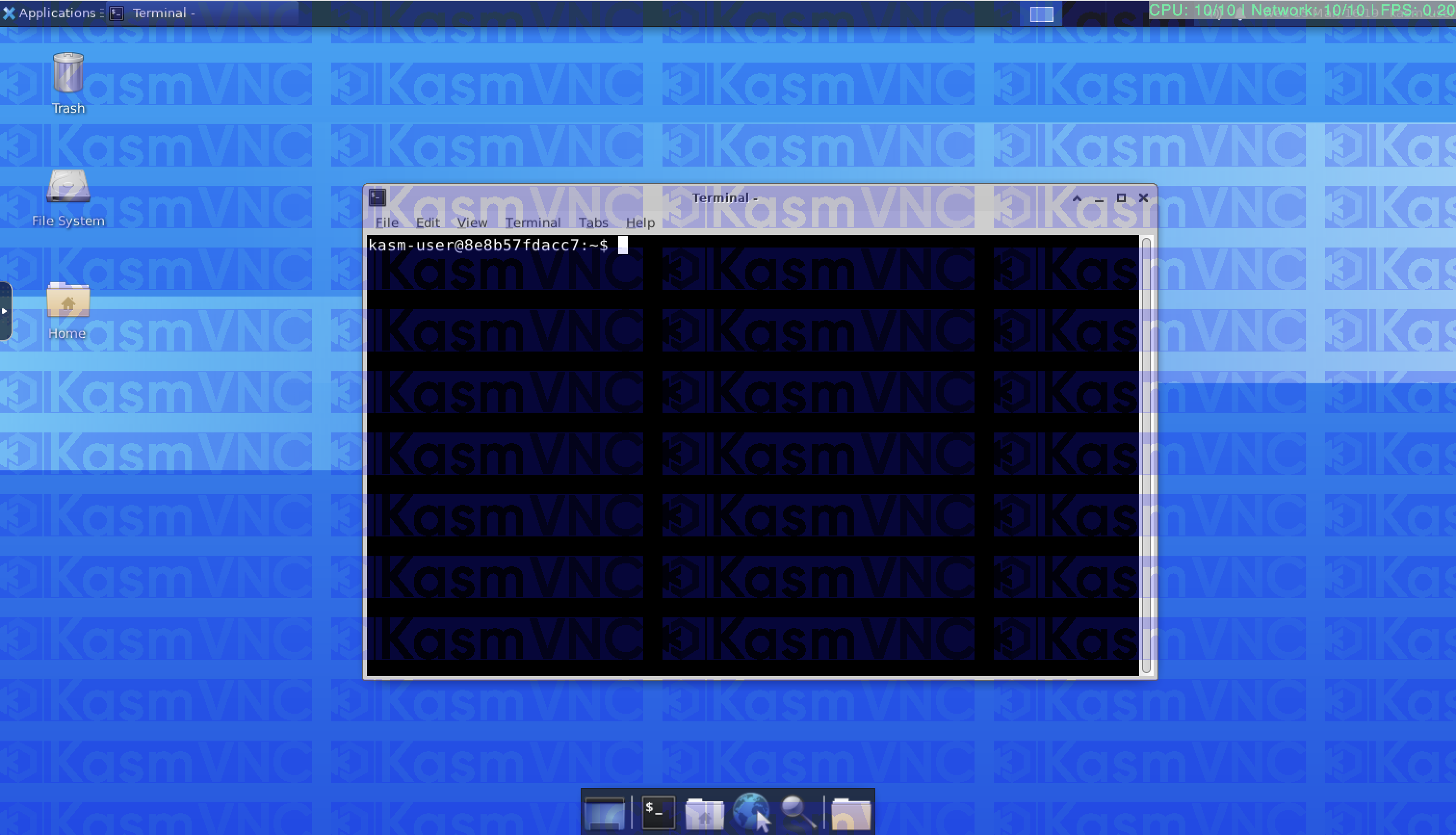
KasmVNC supports rendering a watermark over the rendered session. The watermark is a PNG image file, which is converted to gray-scale. A tint can be applied to the image. A single copy of the image can be placed at a location relative to top left or relative to bottom right. Alternatively, the image can be repeated over the entire screen with a defined spacing. The following configuration and corresponding screenshot shows an example of a watermark, which is tinted blue with an overall transparency of 64 applied.
data_loss_prevention:
  watermark:
    image: /data/kasm.png
    tint: 25,25,255,64
    repeat_spacing: 20
Encoding
| Setting | Default | Unit | Description |
|---|---|---|---|
| encoding.max_frame_rate | 60 | integer | The maximum frame rate that will be sent to the clients. The actual frame rate will be subject to the actual rate of change on the desktop, server-side resources to encode, network performance, and client decoding performance. |
| encoding.full_frame_updates | none | integer | When using UDP, some rectangles can be dropped, so this option forces a full screen update every Nth frame. This only applies to WebRTC UDP transit. A value of none disables this feature. |
| encoding.rect_encoding_mode.min_quality | 7 | integer | The minimum quality setting for JPEG/WEBP encoding. Rendering automatically degrades JPEG quality when there is a lot of motion in a particular block. This setting controls the minimum quality to use when there is a high degree of change. The accepted values are 0..9 where 0 is low and 9 is high. |
| encoding.rect_encoding_mode.max_quality | 8 | integer | The maximum quality setting for JPEG/WEBP encoding. Rendering automatically degrades JPEG quality when there is a lot of motion in a particular block. This setting controls the maximum quality to use when there is no or little motion. The accepted values are 0..9 where 0 is low and 9 is high. |
| encoding.rect_encoding_mode.consider_lossless_quality | 10 | integer | KasmVNC dynamically adjusts the JPEG/WEBP quality based on how much change there is in a particular section. Every x number of frames it sends a 'lossless' update. That way, if you are scrolling, the text blurs a little while you scroll but as soon as you stop, it should clear up on the next lossless update. consider_lossless_quality means “treat this quality as lossless.” Assuming the min quality of 3, the max of 7 and treat lossless of 5. KasmVNC would constantly adjust the quality of images sent anywhere from 3 to 7 depending on the rate of change. If the last rectangle sent was at 5 then it would not send a lossless update for that part of the screen. |
| encoding.rect_encoding_mode.rectangle_compress_threads | auto | integer | Use this many threads to compress rectangles in parallel. auto sets threads to match the core count. |
| encoding.video_encoding_mode.jpeg_quality | -1 | integer | The JPEG quality to use when in video mode. The accepted values are 0..9 where 0 is low and 9 is high. A value of -1 keeps the quality level used in normal mode. |
| encoding.video_encoding_mode.webp_quality | -1 | integer | The WEBP quality to use when in video mode. The accepted values are 0..9 where 0 is low and 9 is high. A value of -1 keeps the quality level used in normal mode. |
| encoding.video_encoding_mode.max_resolution.width | 1920 | pixels | When in Video Mode, downscale the screen to this maximum size. Keeps aspect ratio with the client's actual resolution. |
| encoding.video_encoding_mode.max_resolution.height | 1080 | pixels | When in Video Mode, downscale the screen to this maximum size. Keeps aspect ratio with the client's actual resolution. |
| encoding.video_encoding_mode.enter_video_encoding_mode.time_threshold | 5 | seconds | Number of seconds that a high rate of change must occur before switching to video mode. Setting to 0 forces Video Mode at all times. |
| encoding.video_encoding_mode.enter_video_encoding_mode.area_threshold | 45% | percent | The percent of the screen that must be seeing high rates of change to meet the threshold of Video Mode. This percentage of the screen must see rapid changes for the amount of time specified by encoding.video_encoding_mode.enter_video_encoding_mode.time_threshold. |
| encoding.video_encoding_mode.exit_video_encoding_mode.time_threshold | 3 | seconds | When in Video Mode, high rates of change must subside for this many seconds before dropping out of video mode. |
| encoding.video_encoding_mode.logging.level | off | off|info | Print the detected video area % value. This is useful when trying to tune your settings for your particular use case. |
| encoding.video_encoding_mode.scaling_algorithm | progressive_bilinear | nearest|bilinear|progressive_bilinear | The scaling method to use in video mode. |
| encoding.compare_framebuffer | auto | off|always|auto | Perform pixel comparison on frame buffer to reduce unnecessary updates. |
| encoding.zrle_zlib_level | auto | integer | Zlib compression level for ZRLE encoding (it does not affect Tight encoding). Acceptable values are between 0..9. Set to auto to use the standard compression level provided by the zlib(3) compression library. |
| encoding.hextile_improved_compression | true | boolean | Use improved compression algorithm for Hextile encoding which achieves better compression ratios by the cost of using slightly more CPU time. |
Server
| Setting | Default | Unit | Description |
|---|---|---|---|
| server.http.headers | list | Specify additional response headers to be returned by the built-in web server. See default configuration section for the list of default headers. | |
| server.http.httpd_directory | /usr/share/kasmvnc/www | path | Run a mini-HTTP server which serves files from the given directory. Normally the directory contains the kasmweb client. |
| server.advanced.x_font_path | auto | auto|path | Specify X font path. |
| server.advanced.kasm_password_file | ${HOME}/.kasmpasswd | path | Password file for Basic authentication, created with the kasmvncpasswd(1) utility. |
| server.advanced.x_authority_file | auto | auto|path | Set to X authority file. X authority file stores credentials in cookies used by xauth(1) for authentication of X sessions. auto means using file defined in $XAUTHORITY environment variable. If the variable isn't defined, fallback to using ${HOME}/.Xauthority file. |
| server.auto_shutdown.no_user_session_timeout | never | seconds | Terminate KasmVNC when no client has been connected for this many seconds. A value of never disables this feature. |
| server.auto_shutdown.active_user_session_timeout | never | seconds | Terminate KasmVNC when a client has been connected for this many seconds. A value of never disables this feature. |
| server.auto_shutdown.inactive_user_session_timeout | never | seconds | Terminate KasmVNC after this many seconds of user inactivity. A value of never disables this feature. |
Command Line
| Setting | Default | Unit | Description |
|---|---|---|---|
| command_line.prompt | true | boolean | Guide the user (by prompting), to ensure that KasmVNC is usable. For example, prompt to create a KasmVNC user if no users exist or no users can control the desktop. |